How To Change Cart Style?
Restrofood provides 3 unique cart style options. You can choose the one that you prefer most. You can set it globally from the settings option or a specific Elementor widget. Follow the screenshots to set the settings.
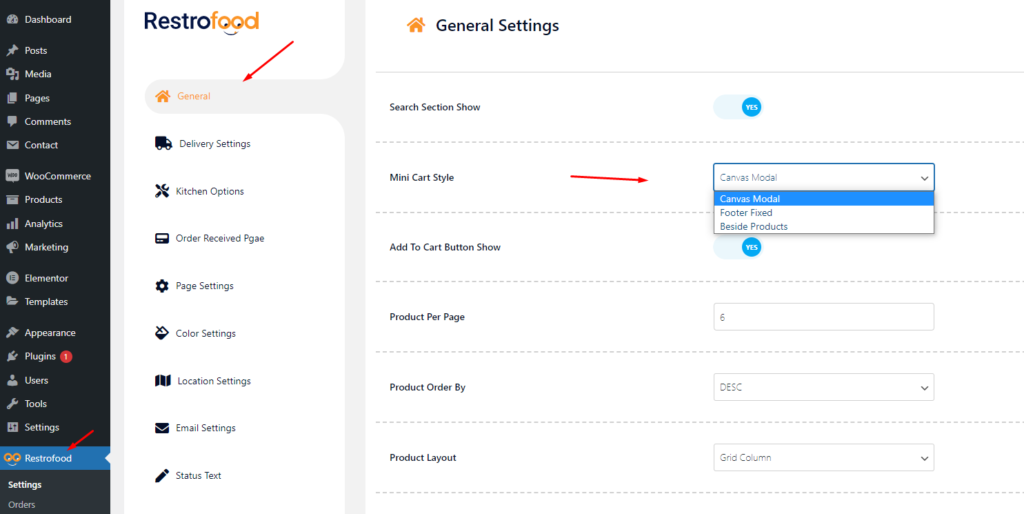
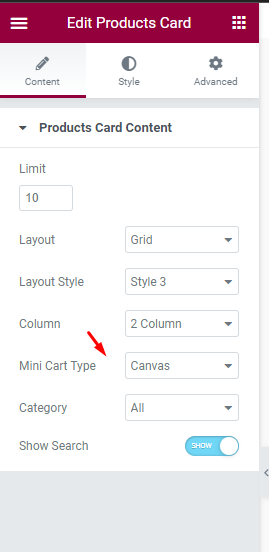

Restrofood provides 3 unique cart style options. You can choose the one that you prefer most. You can set it globally from the settings option or a specific Elementor widget. Follow the screenshots to set the settings.
Restrofood plugin provides an ajax shop page. Where users can see products easily and make a quick order. There have 3 ways to show products in this plugin. Using Shortcode Using RestroFood Template Using Elementor Widget Make sure you are uploaded products before. How to use the shortcode? RestroFood plugin provides a shortcode to show…
Go to Admin -> RestroFood
Welcome to WordPress. This is your first post. Edit or delete it, then start writing!
To create google API key visit the link https://console.cloud.google.com/ and login with your google access. After that, you need to create a project for API credentials with some Library permission. Follow the screenshot below: Library Support: Key Restrictions:
To add product nutrition information follow the screenshot : Preview:
RestroFood provides different time and multiple holiday set options for different branches. Here is the screenshot of how and from where the Delivery/Pickup time and holy day set in the branch admin.


