How to add product nutrition information?
To add product nutrition information follow the screenshot :
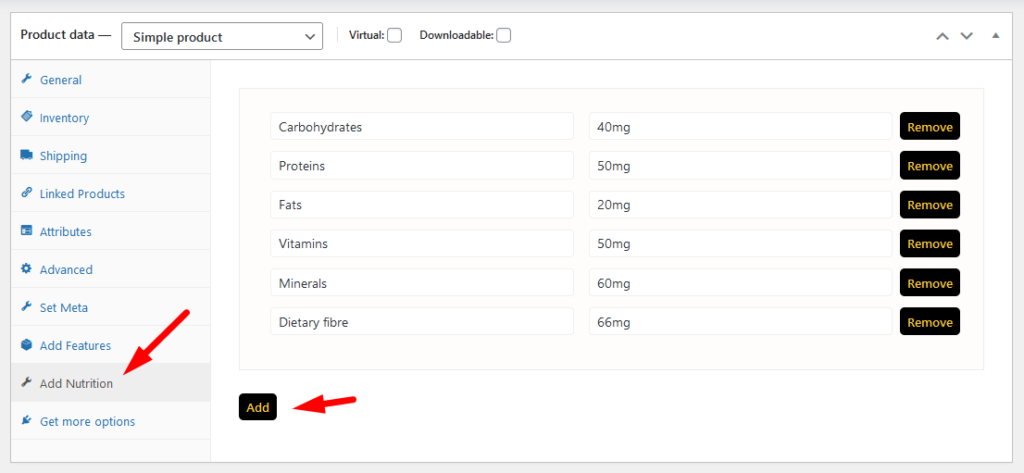
Preview:
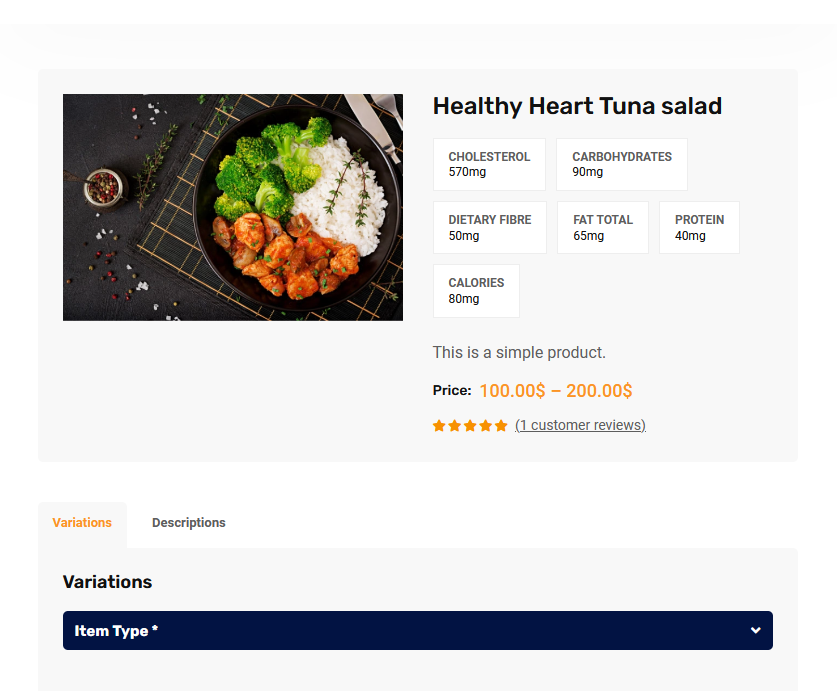

To add product nutrition information follow the screenshot :
Preview:
Item visibility is divided into several mealtimes- Breakfast, Lunch, Dinner, Snack, etc. The item which is being set for breakfast will not be visible as lunch, dinner, or snacks. The same goes for other mealtimes. Have a look at the below-attached screenshots. You’ll get a complete overview.
The main admin can see and controls all branch orders from Branch order manage page. This page can access only main admin user from dashboard. There has so many options in this page. Following the options list below : Order filter by date and branch Show statistic on Total Order, Total Completed Order, Total Cancel…
Restrofood provides order status change option to know order current status. All managers can change the order status from there manager page depends on the order activities and customers also can see the order current status from my account -> order page . Manager Status To Customer Status Behaviors: Question: I accept the order by…
Follow the screenshot to get invoice settings options.
RestroFood provides different time and multiple holiday set options for different branches. Here is the screenshot of how and from where the Delivery/Pickup time and holy day set in the branch admin.


