How to find pre order list in branch and kitchen manager?
There has nice ajax filter option ( Filter by delivery date ) to find pre order list in manager page. Please follow the screenshot:
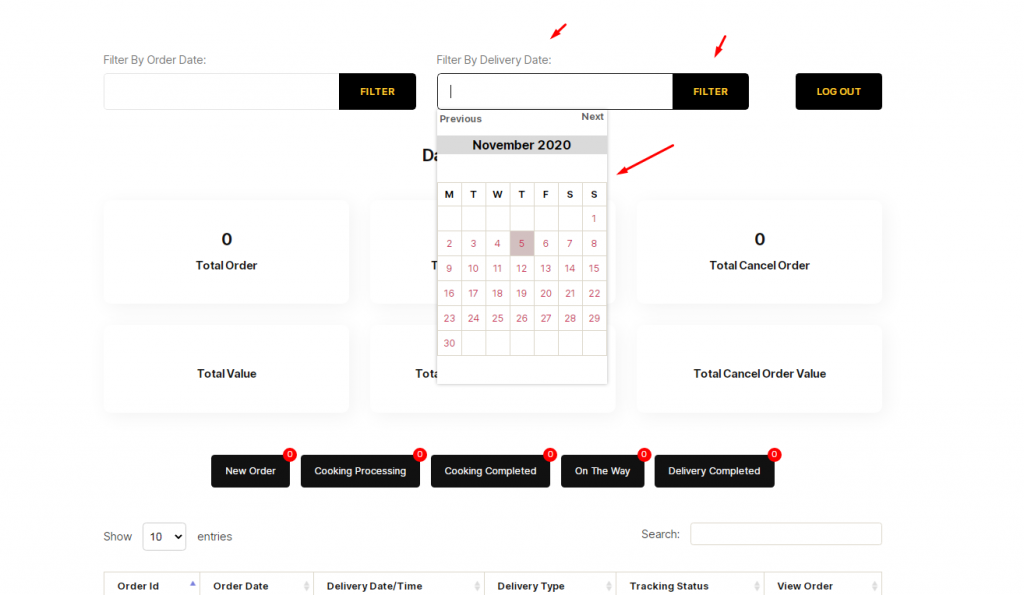
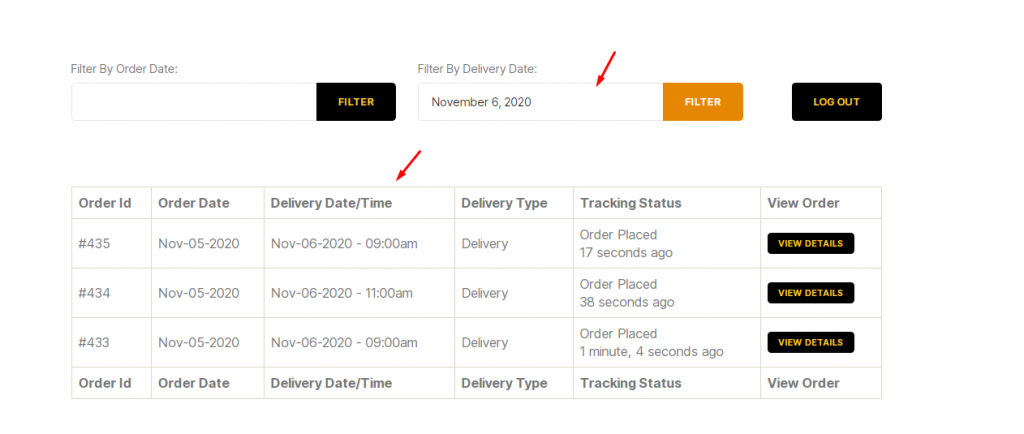

There has nice ajax filter option ( Filter by delivery date ) to find pre order list in manager page. Please follow the screenshot:
Item visibility is divided into several mealtimes- Breakfast, Lunch, Dinner, Snack, etc. The item which is being set for breakfast will not be visible as lunch, dinner, or snacks. The same goes for other mealtimes. Have a look at the below-attached screenshots. You’ll get a complete overview.
You will need to create user to access the branch manager, kitchen manager, and delivery boy. Restrofood provides 3 different user roles for different manager. After installing the plugin you will find 3 new user roles in the user role option. The roles are Branch Manager, Kitchen Manager, and Delivery Boy. Follow the screenshot to…
Set list type and min/mix required option. If you don’t set min or max required number this items are not required for the product to add to cart.
To work time and date properly with your time you need to settings restrofood plugin timezone from restrofood settings and WP admin settings -> general Restrofood settings option: WP admin settings option:


